Chrome Extension • Local-first

WordLyte™ for focused web text.

Highlight, organize, filter, compare, and return to useful text without turning your browser into clutter.

See WordLyte - The Web Text Multi-Tool in action.

Preview the core WordLyte workflows through quick visual snapshots of the extension in action.

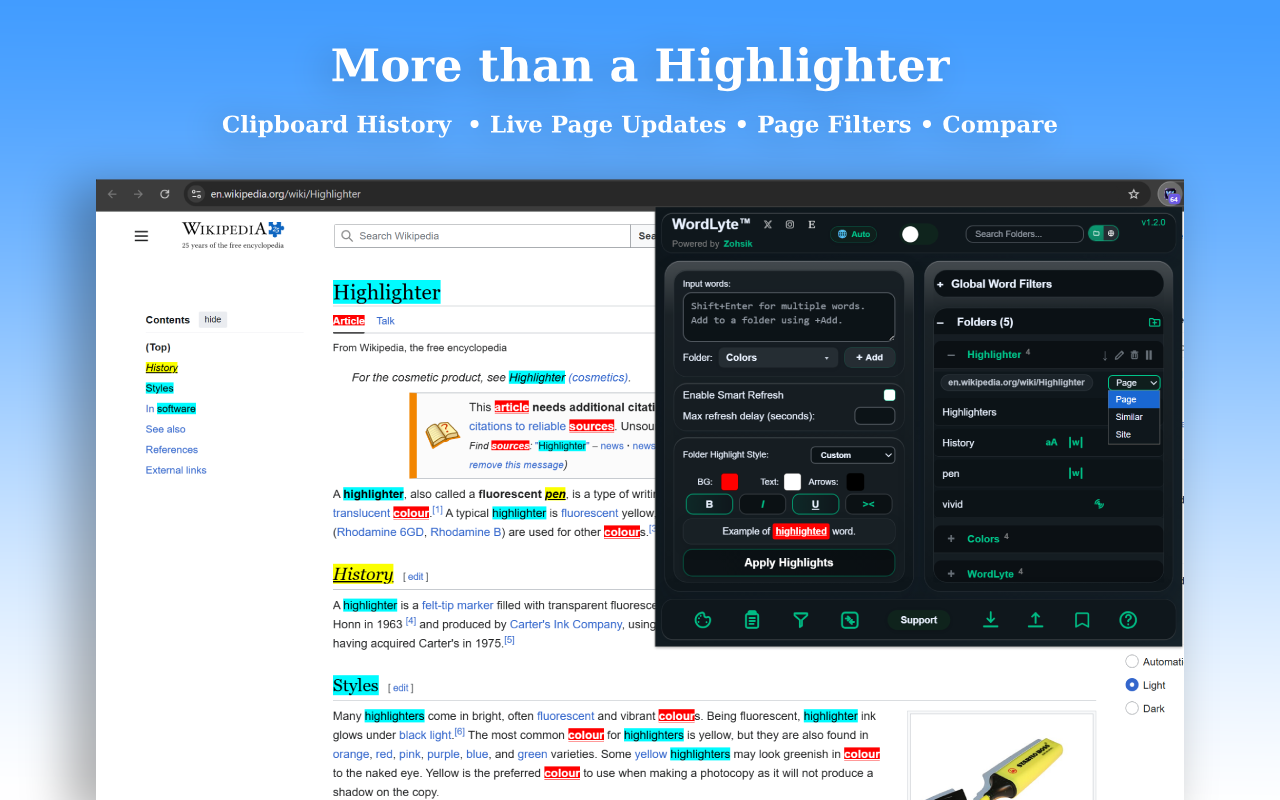
More than a Highlighter
Selected workflow

Word Highlighting

Highlight individual words, keywords, or short word groups across supported websites so the terms that matter most are easier to spot while you read.

Keywords Persistent highlights Smart Refresh
  • Highlight individual words or keywords across any website
  • Optimized for single words and short word groups
  • Highlights persist as you scroll or navigate longer pages
  • Use Case Sensitive matching, Whole Match, Slow Pulse, or per-word pause
  • Search within folders and jump between highlighted words with keyboard navigation
  • Use Smart Refresh to re-check dynamic pages when content loads or changes

Best for reading, research, moderation, spoiler control, keyword tracking, and long pages.

Private by design.

WordLyte is built as a local-first browser tool, so the trust story stays simple.

Local-first Words, folders, and settings stay in your browser.
No account required Use the core extension without creating a login.
No cloud syncing WordLyte does not upload your saved text.
Built for speed Designed for real browsing workflows and daily use.

WordLyte FAQ.

Quick answers for searchers, readers, and new users comparing browser text tools.

What is WordLyte? WordLyte is a local-first web text multi-tool for highlighting words, organizing folders, filtering page text, comparing snippets, and reusing clipboard history.
Does WordLyte upload saved words? No. Words, folders, and settings stay in your browser, with no account required for the core extension.
Which browsers are supported? WordLyte works with Google Chrome, Microsoft Edge, Brave, Opera, Vivaldi, and other Chromium-based browsers.
Can it work as a Chrome word highlighter? Yes. WordLyte can highlight keywords, short word groups, and saved folder words across supported websites.
Does it include clipboard history? Yes. WordLyte includes local clipboard history so recent copied text can be reused quickly while browsing.
Can it compare text snippets? Yes. Compare A/B helps you capture selected text, review snippets side by side, and keep source links close.
Popular ways people use WordLyte

Quick start: add your first word to a folder and watch it highlight across the page instantly.

  • Highlight keywords while researching articles or documentation.
  • Track important names, topics, or terms across long webpages.
  • Hide spoilers, profanity, or unwanted words across the web.
  • Moderate or review online content faster.
  • Compare text snippets side-by-side when fact-checking.
  • Reuse copied text quickly with the built-in clipboard history.
Get WordLyte — The Web Text Multi-Tool

Live on the Chrome Web Store for Google Chrome, Microsoft Edge, Brave, Opera, Vivaldi, and other Chromium-based browsers.

View on Chrome Web Store →

For help, questions, or bug reports: support@zohsik.com.

Version history

Review recent updates in a compact, expandable timeline.

v1.2.1 Latest
  • Fixed an issue where the main UI folders list could start at the bottom.
  • Fixed a small scroll jump when editing words in long lists inside the Bookmarks popup.
  • Applied two minor translation polish fixes.
v1.2.0 — The Elevation Update Previous
  • A major WordLyte upgrade focused on polish, flexibility, customization, and workflow clarity.
  • Added 10 new languages.
  • Added localized keyboard shortcuts.
  • Introduced a fully revamped layout with a top header, dual middle card workspace, and bottom action footer.
  • Fully updated the URL pathing feature for clearer folder scope behavior.
  • Added Case Sensitive, Whole Match, Slow Pulse, and per-word pause controls.
  • Added Custom Folder Highlight Styles.
  • Added Custom Page Filters with Global or Site-scoped behavior.
  • Added the option to disable or enable the badge count inside Page Filters.
  • Expanded Bookmarks so users can manage existing folder and word lists from any site.
  • Added 2 new WL themes.
  • Added a new Folder icon on the right-side Folders row for faster folder creation.
  • Added scoped search for Folders and Global Word Filters.
  • Layout and workflow upgrade — a clearer top header keeps WordLyte branding, language, search, and key controls easier to access.
  • New dual-card center workspace makes left and right panel workflows easier to scan and manage.
  • Bottom action footer keeps core tools and actions visible in one consistent place.
  • Faster access to folder creation, folder management, and scoped search.
  • Better feature discoverability without sacrificing the local-first workflow.
  • Bookmarks upgrade — manage existing folders and word lists across bookmarked sites from anywhere.
  • Quickly review and maintain your saved folder structure across sites.
  • New words still need to be added from the site where the folder was originally created.
v1.1.1 Earlier
  • Clipboard History now uses the proper full overlay experience, bringing it in line with the rest of the extension’s overlay experience.
  • Fixed the missing pt-BR localized store listing.
  • Fixed missing keyboard shortcuts for Clipboard History items 6–10.
v1.1.0 — The Foundations Update Earlier
  • Added Bookmarks for instant return to folder-enabled sites.
  • Overhauled folder foundations with hostname-based site folders and saved per-site order.
  • Revamped Smart Refresh with per-tab control and highlight-aware stopping.
  • Expanded Clipboard History to 10 entries with faster reuse tools.
  • Improved Compact Mode, Global Word Filters, Highlight Styles, Page Filters, i18n, and Themes.
v1.0.2 Earlier
  • Added Valentine’s Day themes.
  • Improved highlight handling on fast-loading and speed-optimized pages.
  • Minor UI refinements and polish.
v1.0.1 Earlier
  • Expanded Lyte Guide with clearer explanations and examples.
  • Improved translations and language consistency across the UI.
  • Page Filters UI refinements and default behavior adjustments.